
Yes, you can migrate any existing website to ColdFusion. The process involves more than moving files—it’s about optimizing your entire environment and often transforms struggling applications into high-performance business engines. Migration is not just possible—it’s often transformative for business applications. When I help clients with a MoverEXPRESS website migration, we don’t just move files from Point A to Point B.
When a specialized software company in the drilling industry came to me, their application wasn’t just a website—it was the engine of their business. It analyzed complex data sets and generated the reports their clients relied on. But that engine had been sputtering.
The site was slow. Reports would hang. Data processing felt like it was moving through sludge. They reached out to their “big-box” host for help, but they kept hitting a wall. The support tickets came back with generic answers that didn’t touch the heart of the problem. They needed someone who spoke ColdFusion.
The Simple Answer: Yes, You Can Migrate Any Website to ColdFusion
Migration is not just possible—it’s often transformative for business applications. When I help clients with this process, we don’t just move files from Point A to Point B. We optimize the entire environment.
Modern ColdFusion is modular and cloud-native, making migrations faster and more efficient than ever before. Using the Modern Package Manager, we only install the components your app actually needs. This approach makes migrations leaner, more secure, and significantly faster.
The key is understanding that can I migrate my existing website to ColdFusion isn’t really the right question. The better question is: “How can migration unlock my application’s potential?”
Why ColdFusion Migration Often Transforms Struggling Applications
ColdFusion offers rapid development capabilities that other platforms simply can’t match. Your development team can produce application results faster than with many other languages, without the complex coding burden that weighs down other platforms.
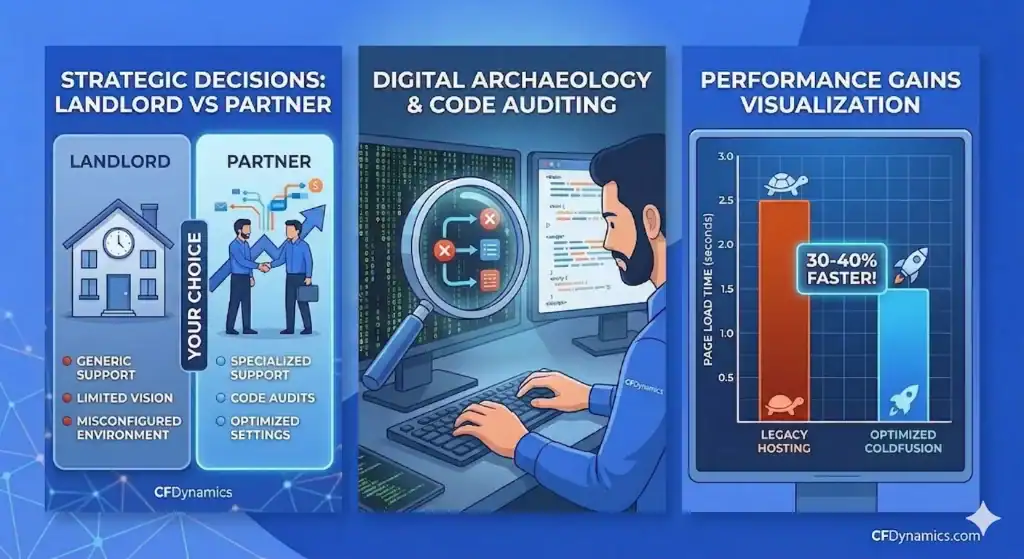
Running on the latest Java 21, we often see 30-40% performance gains just by landing old code in a modern ColdFusion environment. It’s no longer the heavy, all-in-one box it once was—today’s ColdFusion is built for 2026, not 2006.
With native AI/Machine Learning integrations and first-class support for AWS and Azure, ColdFusion combines enterprise stability with modern agility. It isn’t bound by the simple capabilities of a WordPress site or held back by the limitations that plague other platforms.
The Real Migration Process: What Actually Happens Behind the Scenes
When we stepped in with the drilling company, we didn’t start by moving files. We started by listening to the code. We performed a full Code & Environment Review, walking through the application page by page.
What we found was digital archaeology—layers of code left behind by different programmers over the years, some of it conflicting and much of it unoptimized. The biggest challenge was keeping their legacy site alive and functional for their users while we surgically extracted and migrated years of critical data.
We discovered the previous hosting environment had been fundamentally misconfigured for ColdFusion. Databases weren’t tuned for the specific heavy-lift queries the drilling data required, and server resources were being choked by default settings that didn’t account for the application’s unique needs.
We didn’t just move the site; we calibrated it. We tuned the server management, optimized the database connections, and cleaned up the resource bottlenecks that had been ignored for years.
Common Migration Mistakes That Kill Performance
The most common mistake I see is treating ColdFusion applications like simple WordPress sites. People have a limited vision of what ColdFusion can accomplish, so they approach migration with the wrong expectations and tools.
Another critical error is skipping the discovery phase and jumping straight to file transfers. My pro tip: spend the time and money for a paid discovery session with a professional. You need a solid plan moving forward to capture all the features of your existing application as you migrate.
Using generic hosting environments instead of CF-optimized infrastructure kills performance before you even start. Generic hosts apply one-size-fits-all configurations that ignore ColdFusion’s specific resource requirements and optimization opportunities.
Is ColdFusion Still Relevant for Modern Applications?
More than ever. ColdFusion is under continual development and support to improve performance and scalability. The platform has evolved from a monolithic structure to a modular, cloud-native powerhouse.
Today’s ColdFusion offers native AI/Machine Learning integrations for modern business needs and provides first-class support for AWS and Azure cloud platforms. It’s designed for enterprise stability with modern agility.
At CFDynamics, we specialize in this digital archaeology. We take unmaintained legacy applications, run them through Code Hardening Audits, and migrate them into tuned environments. We don’t just give you a new host; we give your application a roadmap for the next decade.
Making the Strategic Decision: Partner vs. Landlord
In my experience, the decision to migrate usually boils down to whether your current host is a partner or just a landlord. I’ve seen many companies stay on platforms where they feel lost and alone because their host doesn’t understand their application’s nuances. In my experience, the decision to migrate usually boils down to whether your current host is a strategic enterprise hosting partner or just a landlord.
When I help clients make this strategic decision, I focus on three primary factors:
The Support Gap: If you’re getting generic answers instead of technical solutions, it’s time to move. We provide real human support that understands ColdFusion code. We don’t just reboot servers; we help you understand why a report is lagging.
Environmental Calibration: Often, a site isn’t broken—it’s just poorly tuned. During migration, we perform code reviews to see how applications utilize resources. We frequently find that big-box hosts have server settings completely wrong for CF applications.
Code Health: Many legacy applications have layers of archaeological code from programmers who are no longer there. We use migration as a chance to perform code hardening audits and establish structured maintenance plans.
Protecting SEO and Functionality During Migration
When considering can I migrate my existing website to ColdFusion without losing search rankings, the answer starts with keeping legacy sites functional during the transition process. We maintain your existing site’s availability while surgically extracting and preparing data for the new environment.
URL structure preservation is critical. We map your existing URLs and create comprehensive redirect strategies to ensure search engines and users can find your content seamlessly after migration.
Our testing and validation protocols run extensive checks before switching DNS. Every form, every database connection, every critical user path gets verified in the new environment before we flip the switch.
The CFDynamics Migration Advantage
With nearly three decades of ColdFusion expertise, we’re not learning on your dime. When you call with a crisis, you get an expert who has seen every server emergency imaginable and knows exactly how to fix it.
Our ColdFusion hosting approach includes code hardening audits and structured maintenance plans. We provide mission-critical reliability with real human support—not chatbots or tier-one scripts.
Migration becomes an opportunity to transform your application from a liability into a growth engine. If your current host makes you feel like a burden for asking technical questions, it’s time to work with a team that views your application’s success as our core mission.